
777D App Download | Android & iOS Betting App
If you want to bet on the go, the 777D app makes it pretty simple. It works on both Android and iOS, downloads quickly, and the layout is easy to get around. Grabbing it straight from the official site is the safest way to make sure it works with your phone. Once you’re in, you can place bets, handle your account, check out promos, and make deposits or withdrawals.
Main Features of the 777D App

🚀 Real-time updated odds
🚀 Live betting support
🚀 Fast login and secure account access
🚀 Easy deposits and fast withdrawals
🚀 App-exclusive promotions and offers
🚀 No need to search for links — place bets directly anytime, anywhere.
🚀 Personal information and data remain protected.
How to Install the 777D App on iPhone/iPad (iOS)
Follow these 6 steps to install the 777D app on an iPhone or iPad:
🍏 Step 1 — Go to the homepage. Tap the “Download App” option at the top of the interface.
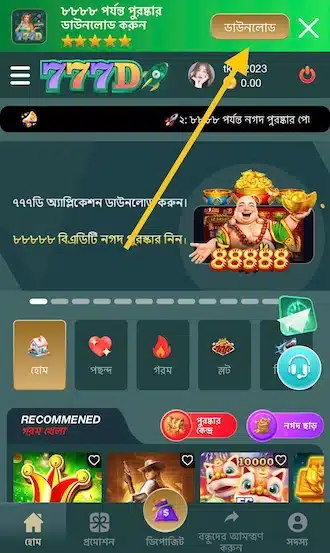
🍏 Step 2 — Two options will appear on the download interface. Choose the app download option for iOS devices.

🍏 Step 3 — A notification will appear on the iPhone saying that the website wants to download a profile. Tap “Allow.”
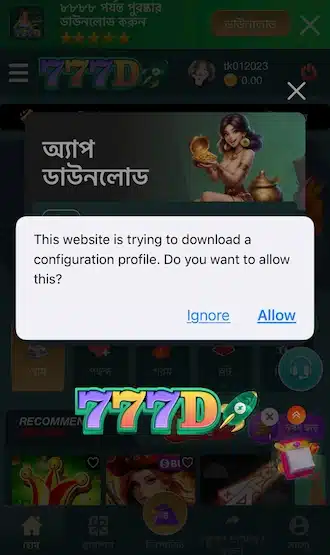
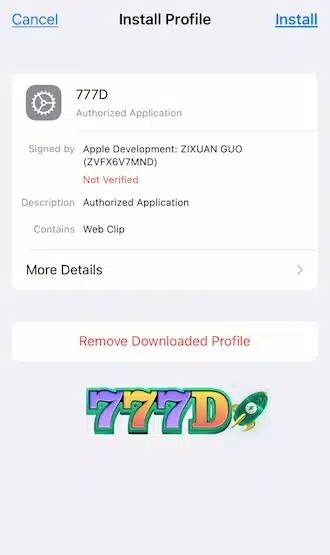
🍏 Step 4 — Go to the VPN and Device Management section in Settings. Select the 777D profile and install it on the device.
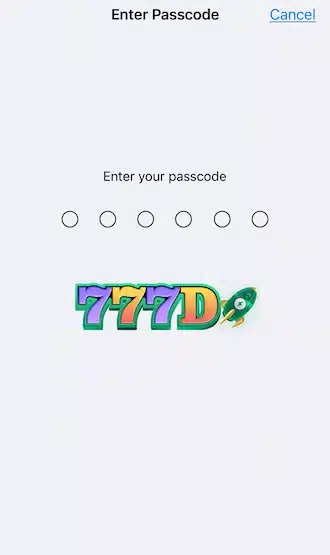
🍏 Step 5 — The iPhone will ask for the passcode to confirm installation. Enter the passcode.
🍏 Step 6 — Installation is complete. Return to the home screen and open the app.
How to Install the 777D App on an Android Phone

Here’s how to install the 777D app on an Android phone in just 4 steps:
🍉 Step 1: Tap the download button. If you see a message saying, “This file may harm your device. Do you want to continue?” just hit OK to keep going.
🍉 Step 2: Wait for the 777D file to finish downloading.
🍉 Step 3: Tap Open to launch the APK file and start installing.
🍉 Step 4: Once it’s installed, you’ll see the 777D app icon on your home screen. Just tap it to open the app, then log in or sign up for a new account.
Common Problems and Solutions When Installing the 777D App

Some problems may occur during download and installation. Common problems and solutions are listed below:
💢 APK file is not installing (Android)
This usually happens when permission to install apps from unknown sources is disabled on the device. Go to Security settings, enable “Allow installation from unknown sources,” and then install again.
💢 The app freezes or does not open
This may happen because of an old version or a system error. Restart the phone or reinstall the latest version of the 777D app.
💢 Low storage
Free space is required to install and run the app. Delete unnecessary apps or data, then install again.
💢 Download is slow or installation takes too long
This happens because of a weak internet connection. Connect to stable Wi-Fi or mobile data and download again.
💢 Installation error
This happens when the device does not meet the minimum system requirements. Check the operating system version and update it if needed.
💢 Device is not supported
The app does not work on some older phones. The device must have Android 10 or later, or iOS 15 or later.